Your Plan
Introduction
Welcome to the Your Plan section of the Fabulous50S Vitality App. This section helps you organize and follow your personalized workout schedule. Your workout plan is displayed in an easy-to-understand format, allowing you to view scheduled exercises by week or by day and stay consistent with your fitness journey.
Description:
View your personalized workout schedule with Weekly and Daily planning options. Browse your assigned workouts, select specific dates, and access guided workout videos based on your chosen fitness program.
Accessing the Your Plan Page
To get started with your personalized workout schedule, follow these steps:
Step 1: Select the Your Plan Menu
- Navigate to the Your Plan Menu: From the bottom navigation bar, tap the Your Plan menu.
- Open Your Weekly Plan: You will be redirected to the Your Weekly Plan page, where your scheduled workouts are displayed.
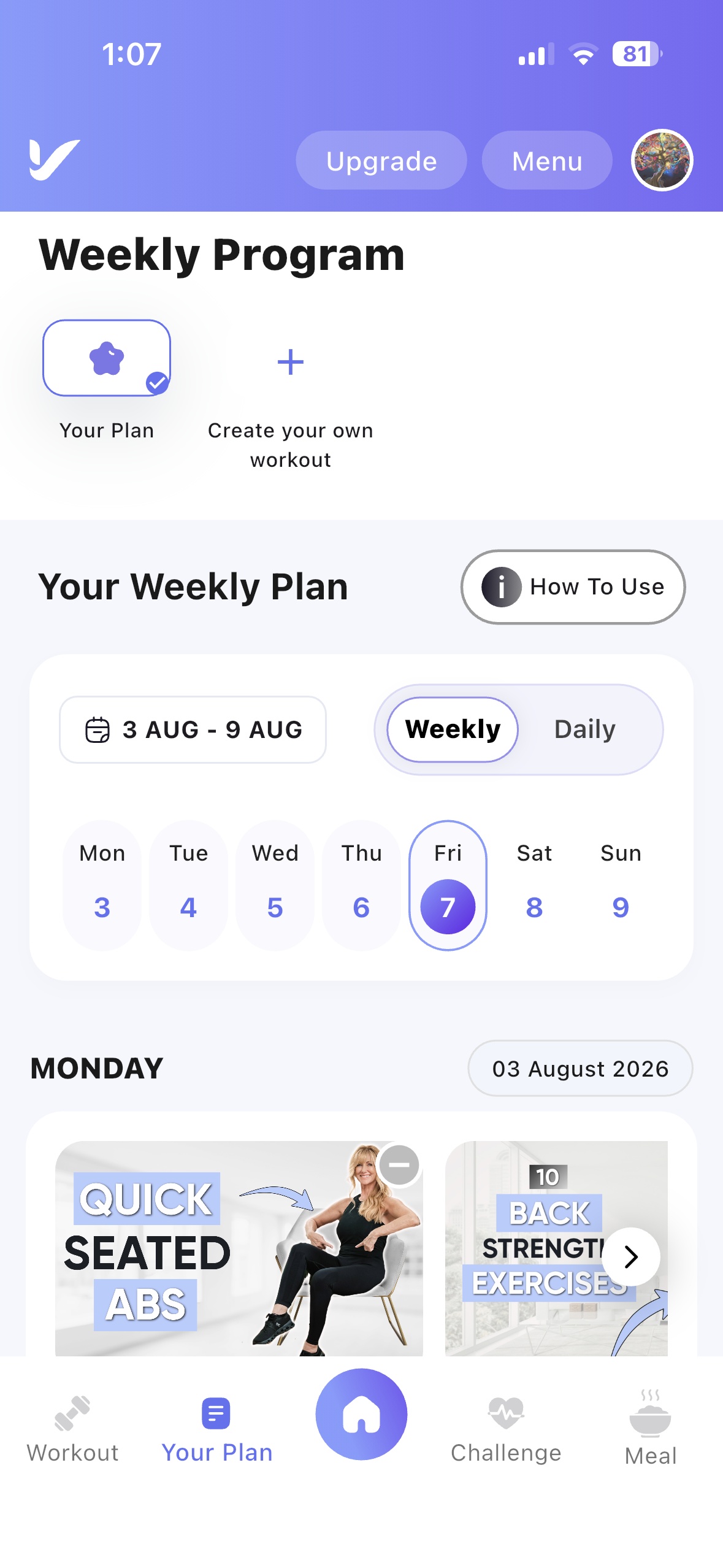
Your Weekly Plan Layout
The Your Weekly Plan page provides a simple and organized view of your workout schedule, making it easy to plan and complete your daily exercises.
Weekly Program
The Weekly Program section displays all the workout programs assigned to you. Simply tap any program to view its workout schedule.
How to Use
A How to Use button is available at the top-right of the Your Weekly Plan page.
- Tap How to Use to watch a short tutorial video.
- The video explains how to:
- Navigate the Your Plan page.
- Select workout programs.
- Switch between Weekly and Daily views.
- Choose workout dates.
- Access your scheduled workouts.
Weekly and Daily View
Your workout schedule can be viewed in two different layouts:
- Weekly View – Displays the workouts planned for the entire week.
- Daily View – Displays only the workouts assigned for the selected day.
Workout Calendar
The built-in calendar helps you quickly navigate your workout schedule.
- Displays the current week's dates.
- Tap any date to view the workouts scheduled for that day.
- The selected date is highlighted automatically.
Scheduled Workouts
Below the calendar, the workouts assigned for the selected day are displayed.
Each workout card includes:
- Workout thumbnail
- Workout title
- Assigned workout for the selected date
- Quick access to start the workout